Zero Copy I/O
Problem: Operating systems commonly stream data between user level programs and physical devices. However, it takes a ton of time to do so since we move data from hardware to kernel then userspace or vice versa.
Potential Solutions that don’t work: We could move the application into the kernel directly so the data doesn’t need to be copied from kernel to userspace. (This is not secure) We could also modify syscalls to allow applications to modify the data stored in the kernel buffer. (This isn’t flexible, it doesn’t allows for modifications)
Solution 1: Use the process’ page table The application aligns the user level buffer to a page boundary which is then provided to the kernel. Thus, a page-to-age copy from user to kernel space can be simulated by changing page table pointers instead of physically copying memory.
Virtual Machines
- A way for a host OS to run a guest OS as an application process.
- They are widely used on client machines to run non-native applications, are used in data centers to allow a machine to be shared by multiple machines
Virtual Machine Page Tables
- There are two sets of page tables, guest and host
- The host OS provides a set of page tables to constrain the execution of the guest OS which is thinking it is running on a real OS but it is actually running on virtual memory.
- The host translates the guest virtual addresses into physical addresses
- The guest OS manages page tables for the guest processes, exactly the same as if it was on real hardware. This is because the guest OS thinks it is on real hardware.
When the host OS transfers control to the guest OS, everything works as expected.
When the guest OS transfer control to the guest process, this is a privileged instruction and the hardware processor will first trap back to the host. However, we can’t use the guest OS page table, since it is using virtual addresses instead of physical addresses. Nor could we use the host OS page table since the guest OS should not have permission to modify that content. Thus, we will need to use Shadow Page Tables.
Shadow Page Table
A composite page table that represents both the guest and host page tables.
- To keep the shadow page table up to date, the host needs to check if any shadow page tables need to be updated before it changes a page table entry.
- To keep the shadow page table up to date, the host also sets the memory of the guest page tables as read only. Thus, the guest OS traps the host every time it makes a change to a page table entry. When trapping, the host updates both the guest page table and the corresponding shadow page table.
Transparent Memory Compression
- Problem: Multiplexing multiplexors is hard. For example, a data center usually has a single physical machine running many virtual machines at the same time(ie a computer hosting multiple web sites)
- When a guest OS is running two copies of the same program or process, the host kernel has no way to share pages between the two instances.
- Solution: Commercial Operating systems run a scavenger in the background that looks for common pages that can be shared among multiple virtual machines. Once identified, the host kernel provides an illusion that each guest has its own copy.
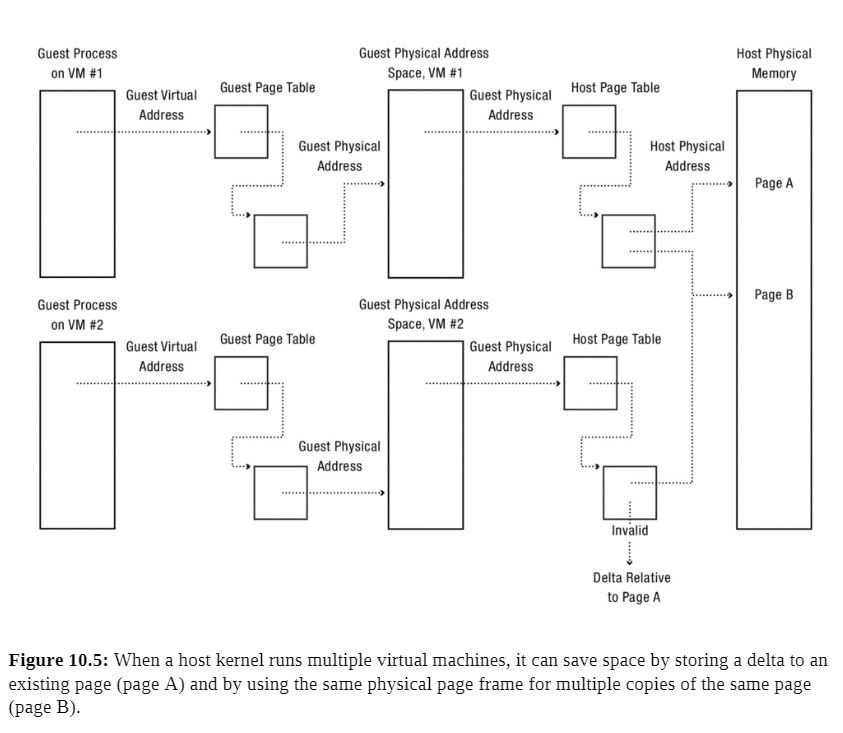
- Case 1: Multiple copies of the same page Multiple virtual machines might share a zeroed page, it would be wasteful to create a new zeroed page for each virtual machine that needs one. The host OS instead allocates a read-only zero page, which traps the host kernel when modified and allocates a new zeroed physical page for the guest OS.
They scavenger runs in the background looking for zeroed pages
- Case 2: Compression of unused pages Pages can differ by small amounts, this lets the host kernel add a layer in the memory hierarchy to save space. Instead of evicting a relatively unused page, we can save its delta with regards to the original page, and the full copy the delta is from stays read only.
If the original page is modified, the delta can be quickly recompressed or evicted as necessary.
Fault Tolerance
All systems break, but how can we manage memory to recover application data structures after a failure, not just user file data?
Checkpoint and Restart
- Naive Solution: Periodically save the program’s internal data to a file.
- General Solution: The OS uses the virtual memory system to provide application recovery as a service Implementation:
- Suspend each thread executing in the process and save its state. (Suspending threads is to avoid race conditions)
- Store a copy of the contents of the application memory on disk (this is the checkpoint)
- After a failure, resume execution by restoring the contents of memory from the checkpoint and resume each of the threads.
Use address translation to minimize the amount of time the system is stalled during a checkpoint. We can mark the application pages as copy on write to do so.
- Process Migration: The ability to take a running program on one system, stop the execution, then resume it on a different machine.
Recoverable Virtual Memory
Unfortunately, checkpoint + restart is an expensive operation that we should use sparingly. Is it possible to provide the application the illusion of persistent memory, so that the contents are restored to a point not long before failure?
Implementation:
- Take a checkpoint so that some consistent version of the application data is on disk
- Record a log of every update that the application makes to memory.
- Once things crash, read the checkpoint and apply the correct changes from the log.
Pros: This is how text editors save their backups. Cons: Information that is not on the current version of the file can be leaked!
Incremental Checkpoint: Created by stopping the program and saving a copy of any pages that have been modified since the previous checkpoint.
How much work is lost during a crash is a function of how quickly we can write an incremental checkpoint to disk.
Deterministic Debugging
- Debugging a concurrent program is hard, we don’t control the scheduler, thus depending on how threads are scheduled program runs may vary.
- Debugging an OS is even harder, the OS uses widespread concurrency but also makes it difficult to tell input from output.
- Implementation: Use a virtual machine abstraction to allow for debugging. The host kernel mediates the initial state, the input data from I/O devices, and precise timing of interrupts.
- For multicore systems, we also need to track the order in which threads go through critical sections in addition to the initial state, the input data from I/O devices, and precise timing of interrupts
Security
The operating system needs to protect itself and other applications from malicious or buggy implementations.
Virtual Machine Honeypot: Run the suspect application in a virtual machine constructed for the purpose of running suspect code. We can delete the virtual machine if the code is suspect.
User Level Memory Management
Operating Systems now provide users the ability to:
- Decide where to get missing pages. (local disk, non-volatile memory, remote memory, etc.)
- Which pages can be accessed
- Which pages should be evicted.
Storage Devices
Persistent Storage devices like SSDs or Magnetic Disks can hold much more memory but are much slower than DRAM.
Magnetic Disk
Description: Each disk drive holds one or more platters, which are the CD looking things that hold up the magnetic material. When the disk drive powers up, the platters are constantly spinning on the pole. The disk head reads/writes data by sensing or introducing a magnetic field on a surface. Since the platter is spinning very fast, it generates a layer of rapidly spinning air, which lets the disk head float close to the magnetic material without touching it. If the disk head does touch the material, this is known as a disk crash. This can happen when you drop a running magnetic disk.
The data itself is stored in 512 byte sectors, the disk drive must read and write the entire sector even if it only wants to change a single byte in the sector.
- Track Buffering: Improves performance by storing sectors that have been read by disk head but not yet requested by the OS.
- Write acceleration: Stores data to be written to disk in the disk’s buffer memory and acknowledges the writes to the OS before the data is written to the platter. The data is actually written later. Of course, if power is lost before the disk’s buffer memory has been stored, then data might be lost.
- Tagged command queueing: Issue multiple concurrent requests to disk and the disk processes the requests out of order in an optimal manner.
Access and Performance
To go from a request to data, the disk must first seek the right track, wait for the desired sector to rotate to the head, then transfer the blocks. The equation for this is
disk access time = seek time + rotation time + transfer time
- Seek Time: Move the arm over the desired track(each track is kind of like a different lane on a track in track and field). The minimum seek time is the time it takes for the head to move from one track to an adjacent one. The maximum seek time is the time it takes for a disk to move from the innermost track to the outermost track. The average seek time is the average seek time across all possible pairs of tracks on a disk, this is usually approximated to the time it takes to seek a third of the way across a disk
- Rotation Time: After the disk head and found the correct track, it must wait for the target sector to rotate under it. The waiting time is known as the rotational latency. However, most disks start reading the entire track’s sectors into their buffer memory.
- Transfer time: After the disk head is on the target sector, the disk must transfer the data from the target sector to the buffer memory(for reads) or from the buffer memory to the target sector(for writes). Then, it transfers the buffer memory to main memory for reads or vice versa for writes. The surface transfer time is the time to transfer one or more sequential sectors from a surface once the disk head begins reading. Thus, the surface transfer time is usually faster for outer tracks than inner tracks since outer tracks have a higher linear velocity.
Flash Storage
Flash storage is now used for laptops, machine room servers, phones, cameras, thumb drives, and everything in between. Flash storage is a type of solid state storage, it has no moving parts and stores data using electrical circuits. It has much better random I/O, use less power, and is less vulnerable to physical damage.
Each flash storage element is a floating gate transistor. Since the floating gate is surrounded by an insulator, it can hold an electrical charge for months or years without requiring power. Even though it is not connected to anything, it can be charged or discharged via electron tunneling by running a sufficiently high-voltage current near it. Thus, the floating gate state can be detected by applying an intermediate voltage to the transistor control gate that will only be sufficient to activate the transistor if the floating gate is changed.
Access and Performance
There are three operations we can perform on flash storage.
- Erase erasure block: Before flash memory can be written, it must be erased by setting each cell to a logical one. Flash memory can only be erased in large units known as erasure blocks. This is a slow operation, taking several milliseconds.
- Write Page: Once erased, NAND flash memory can be written on a page-by-page basis, where each page is typically 2048-4096 bytes. This takes tens of microseconds.
- Read Page: NAND flash memory can be read on a page by page basis. Reading usually takes tens of microseconds.
Calculations
Without remapping
Time per write = (sizeof erasure block / page size) * (page read time + page write time) + block erase time
With remapping
Time per write = block erase time / (sizeof erasure block / page size) + page write time
Remapping amortizes the cost of flashing an erasure block.
Durability
Over time, the high current loads from flashing and writing memory causes the circuits to degrade. Eventually after a few thousand to few million erasures, a given cell will wear out and no longer reliably store a bit.
Thus, flash devices use:
- Error correcting codes: Each page has some extra bytes to protect against bit errors in the page
- Bad page and bad erasure block management: If a page or erasure block has a manufacturing detect or wears out, the firmware marks it as bad and stops storing data on it.
- Wear leveling: Rather than overwriting a page in flash, the flash translation layer remaps the logical page to a new physical page that has already been replaced. Thus, we wear out the flash device evenly
- Spare pages and erasure blocks: Manufacturers may include spare pages and spare erasure blocks to provide extra space for wear leveling and to allow for bad page and bad erasure block management without shrinking the capacity of the storage device.
The future for memory devices
- Spinning disk vs flash storage: Textbook is outdated, flash storage is almost always better
- Phase change memory: Use a current to alter the state of glass between amorphous and crystalline forms which represents the data bit(0 or 1). Apparently it has better write performance and endurance than flash, though right now storage density isn’t that great.
- Memristor A circuit element whose resistance depends on the amounts and directors of currents that have flowed through it in the past. The goal is for each core on a 32 core processor chip to have a few gigabytes of stacked memristor memory